Migrating from Kubernetes Dashboard to Headlamp: a practical guide
A 2026 guide details how to replace Kubernetes Dashboard with Headlamp, shifting from form-based deployments to YAML-driven workflows and multi-cluster management.
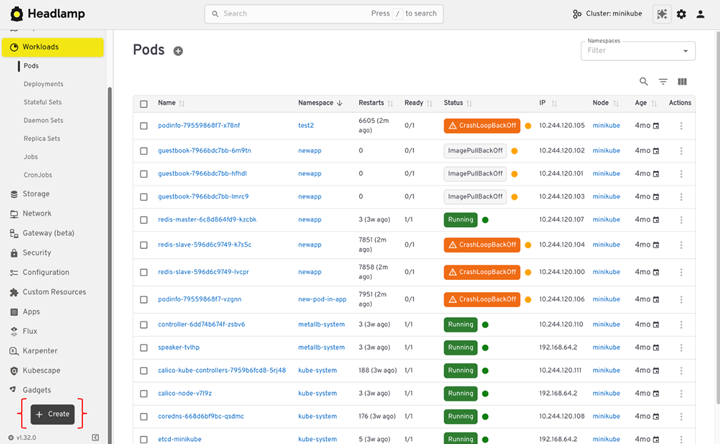
In a post on the Kubernetes Blog in July 2026, platform engineers received a detailed migration path from the legacy Kubernetes Dashboard to Headlamp. The guide outlines the technical steps required to switch interfaces, emphasizing security hardening and workflow adjustments for teams managing modern clusters.
What happened
The Kubernetes ecosystem has long relied on the official Kubernetes Dashboard for visual cluster management, but maintenance and feature parity have become concerns for many platform teams. The July 2026 publication serves as a definitive manual for organizations ready to adopt Headlamp, an open-source alternative that aligns more closely with current GitOps and infrastructure-as-code practices. This transition is not merely a cosmetic change but involves fundamental shifts in how users authenticate, deploy applications, and troubleshoot workloads.
The guide addresses both desktop and in-cluster deployment scenarios, recognizing that different teams have varying security requirements and operational models. For desktop users, the focus is on leveraging existing kubeconfig files to maintain seamless access without introducing new credential management overhead. For in-cluster installations, the documentation provides strict guidelines on securing the UI behind identity providers and ensuring that network policies restrict access appropriately. This dual approach ensures that the migration can be tailored to the specific risk profile of each engineering team.
Crucially, the article highlights that Headlamp is designed to respect existing Role-Based Access Control (RBAC) policies rather than bypassing them. This means that the migration does not require a complete overhaul of cluster permissions, but it does demand a review of service accounts and bindings that were previously created specifically for the old Dashboard. By treating the UI as just another client of the Kubernetes API, Headlamp enforces the principle of least privilege by default, showing users only the resources and actions their identities are authorized to perform.
How it works
Headlamp operates as a client that reads standard kubeconfig files, similar to how kubectl functions. On desktop installations, it automatically detects the user’s current context and credentials, eliminating the need for separate token generation or login flows. For in-cluster setups, it supports OpenID Connect (OIDC) for centralized authentication, allowing enterprises to integrate with their existing identity providers. The UI dynamically adapts to the user’s permissions, hiding edit or delete buttons if the underlying RBAC rules do not permit those actions.
Unlike its predecessor, which relied heavily on wizard-style forms for creating resources, Headlamp prioritizes YAML manifests. This design choice reflects the industry’s shift toward declarative configuration managed via version control. Users create resources by pasting or uploading YAML files directly into the interface, which validates the manifest against the Kubernetes API before applying it. This method ensures that what is deployed via the UI is identical to what would be applied through a CI/CD pipeline, reducing drift between manual and automated operations.
The interface also introduces a Map View, which visualizes relationships between resources such as Deployments, ReplicaSets, Pods, and Services. This feature aids in troubleshooting by providing a holistic view of how components connect, rather than forcing users to navigate through multiple list views. Combined with enhanced search and filtering capabilities, this allows engineers to quickly isolate issues in complex namespaces without losing context.
Key details
- Headlamp reads clusters directly from kubeconfig files, supporting multiple configurations via environment variables separated by colons on Unix or semicolons on Windows.
- Authentication for in-cluster instances relies on OIDC, requiring proper configuration of callback URLs and forwarding of X-Forwarded-Proto headers by ingress controllers.
- Resource creation is performed exclusively through YAML manifests, replacing the form-based wizards found in Kubernetes Dashboard.
- The Map View provides a visual graph of resource dependencies, helping users understand connections between workloads, services, and storage.
- Pod logs stream live in the UI, and users with appropriate RBAC permissions can execute interactive terminal sessions directly within the browser.
- Metrics visualization requires the metrics-server to be installed in the cluster; otherwise, the UI displays a notice indicating missing data.
Why it matters
For software developers and platform engineers, this migration represents a move toward greater operational consistency. By removing the abstraction layer of form-based deployments, Headlamp encourages teams to work with the same YAML definitions used in their Git repositories. This reduces the cognitive load when switching between local development, manual debugging, and automated pipelines. It also mitigates the risk of configuration drift, as every change made through the UI is based on a concrete manifest that can be reviewed and versioned.
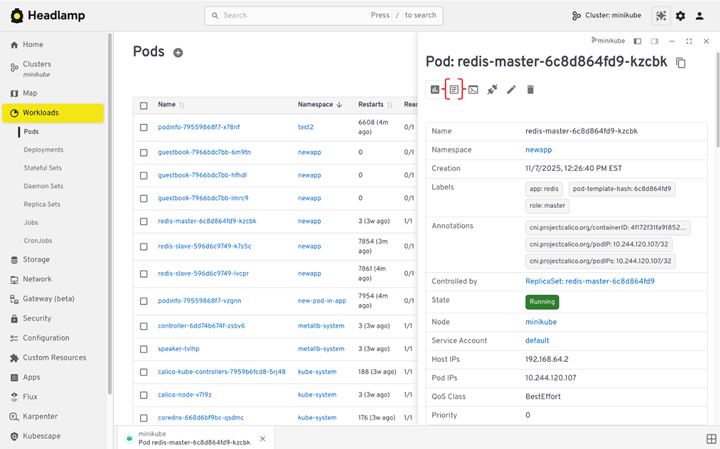
Security posture improves significantly because Headlamp does not require elevated service account tokens with broad cluster-wide permissions. Instead, it leverages the individual user’s identity and RBAC rules. This means that if a developer’s access is revoked in the identity provider, their ability to interact with the cluster via Headlamp is immediately terminated. This alignment with zero-trust principles is critical for organizations managing sensitive workloads across multiple environments.
Additionally, the multi-cluster support simplifies the daily workflow for engineers who manage dev, staging, and production environments. Rather than maintaining separate browser tabs or reconfiguring contexts constantly, users can switch between clusters within a single interface. This efficiency gain is particularly valuable during incident response, where speed and context switching can impact resolution times.
What you can do
- Verify your current kubeconfig setup by running kubectl config current-context and ensuring you can list nodes and pods before installing Headlamp.
- Configure OIDC integration for in-cluster deployments, ensuring your identity provider allows the specific callback URL ending in /oidc-callback.
- Generate YAML manifests using kubectl create with the --dry-run=client flag to replicate the ease of form-based creation while maintaining declarative best practices.
- Review and remove legacy service accounts and cluster role bindings that were created exclusively for Kubernetes Dashboard access after confirming Headlamp functionality.
- Install metrics-server in your clusters to enable CPU and memory usage visualization within the Headlamp interface.
- Update internal documentation and onboarding guides to reflect Headlamp as the primary UI, including instructions for accessing the Map View and executing terminal sessions.