Handling GPU failures in Kubernetes for AI workloads
Kubernetes lacks native support for partial device failures, forcing engineers to build custom remediation logic for expensive AI and ML training jobs.
In a post on the Kubernetes Blog in July 2025, Sergey Kanzhelev and Mrunal Patel outlined the growing complexity of managing hardware failures in containerized AI environments. They explained how the static resource model of Kubernetes struggles to cope with the dynamic and costly nature of GPU disruptions in modern machine learning pipelines.
What happened
The rise of artificial intelligence and machine learning workloads has exposed significant gaps in how Kubernetes handles specialized hardware. While the platform excels at orchestrating standard web services, it was not originally designed for the specific demands of GPU-intensive tasks. The authors highlighted that hardware issues, particularly GPU failures, are now a primary cause of disruption in AI training, as noted in the 2024 Llama paper. Data from NVIDIA’s infrastructure teams supports this, showing nineteen remediation requests per thousand nodes daily, indicating that device failure is a routine operational event rather than an exception.
Kubernetes traditionally views resources as binary: a resource is either available or it is not. This static assumption fails when dealing with partial hardware degradation or transient errors common in large-scale data centers. The article contrasts traditional workload assumptions with current realities. Previously, applications could run on any node, and failed pods were easily replaced. Today, AI workloads require specific device classes, often span multiple nodes in complex topologies, and involve massive container images that make restarts prohibitively expensive. Idle time on these specialized nodes represents a significant financial loss, making efficient failure handling critical.
Despite these challenges, Kubernetes remains the dominant platform for AI due to its maturity, security features, and extensive ecosystem. The authors argue that while alternative platforms exist, they lack the years of refinement Kubernetes offers. Consequently, the community is focused on adapting existing mechanisms to better support these new workload types rather than starting from scratch.
How it works
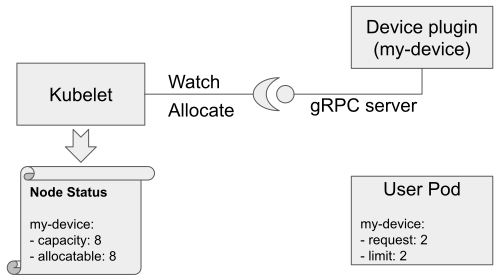
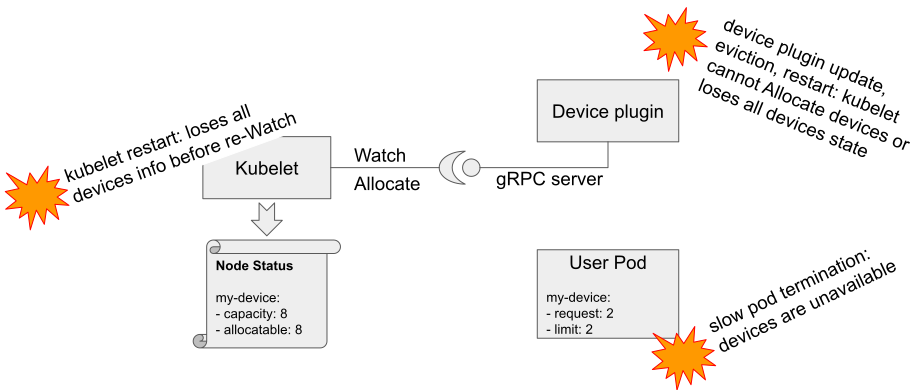
Understanding device failures requires looking at the interaction between several Kubernetes components. When a pod is scheduled, the device plugin registers with the kubelet, which updates the node’s capacity. The scheduler then places the user pod based on this information, and the kubelet asks the plugin to allocate the specific devices. This chain involves multiple network calls and state changes, creating numerous points where interruptions can occur. If any part of this sequence fails, the pod may fail admission, stall during scheduling, or run on unhealthy hardware.
Currently, Kubernetes has limited built-in logic for detecting and recovering from device-specific failures. Device plugins typically report failures by reducing the count of allocatable devices, but the system does not automatically correlate this with running containers. Standard mechanisms like liveness probes may detect a crash, but Kubernetes will simply restart the container on the same potentially faulty device. This leads to crash loops where the application cannot recover because the underlying hardware issue persists. To mitigate this, engineers must rely on external signals and custom logic to identify when a device is truly unusable and trigger a more aggressive remediation strategy.
Key details
- AI/ML workloads differ from traditional apps by requiring specific hardware, having expensive initialization times, and operating as coordinated groups rather than independent units.
- NVIDIA reports approximately 19 device remediation requests per 1,000 nodes daily, highlighting the frequency of hardware issues in production.
- Kubernetes currently lacks native correlation between device health status and container crashes, often leading to ineffective restarts on faulty hardware.
- Driver compatibility is a new failure mode, requiring strict matching between hardware, drivers, and application libraries like NCCL.
- Best practices include configuring graceful termination logic, monitoring device plugin health, and avoiding overloading nodes with non-critical workloads.
Why it matters
For software engineers and infrastructure leads, the inability of Kubernetes to natively handle partial device failures means higher operational overhead and increased costs. In traditional web services, a failed pod is a minor inconvenience. In AI training, a single pod failure can force a restart of an entire multi-day job, wasting thousands of dollars in compute resources. The static resource model forces teams to build complex, custom watchdogs to monitor hardware health, diverting engineering effort from core product development.
Furthermore, the lack of standardized failure handling creates portability issues. Solutions developed for one cluster may not work in another, especially when using different device plugins or hardware vendors. As organizations scale their AI initiatives, these DIY fixes become difficult to maintain and debug. Understanding these limitations is essential for designing resilient architectures that can tolerate hardware volatility without manual intervention.
What you can do
- Implement a node health controller that monitors the difference between device capacity and allocatable counts to trigger node recreation when thresholds are exceeded.
- Use pod failure policies in Kubernetes Jobs to define specific exit codes for device errors, allowing for targeted retries rather than generic restarts.
- Deploy custom pod watchers that utilize the Pod Resources API to detect unhealthy devices and delete attached pods, forcing rescheduling on healthy nodes.
- Ensure device drivers and plugins are from trusted sources and plan upgrades carefully to maintain compatibility with your application stack.
- Configure tolerations for node readiness flakes and set up graceful termination logic to prevent devices from being locked by failing processes.
- Avoid running low-priority workloads on nodes with specialized hardware to reduce the risk of interrupting critical device plugins and kubelet operations.